 mivupia
A small step. A friend beside you.
A little care.
A little company.
Make room for one good thing today. Pick a small task, spend a few focused minutes, and grow alongside a companion of your own.
Getting ready for our first iPhone release.

A few of the companions you’ll meet. You choose their name.
A look inside
A good day can
start small.
There’s no perfect routine to keep up with. Just a few ways to make a little space for yourself.
Start with what fits.
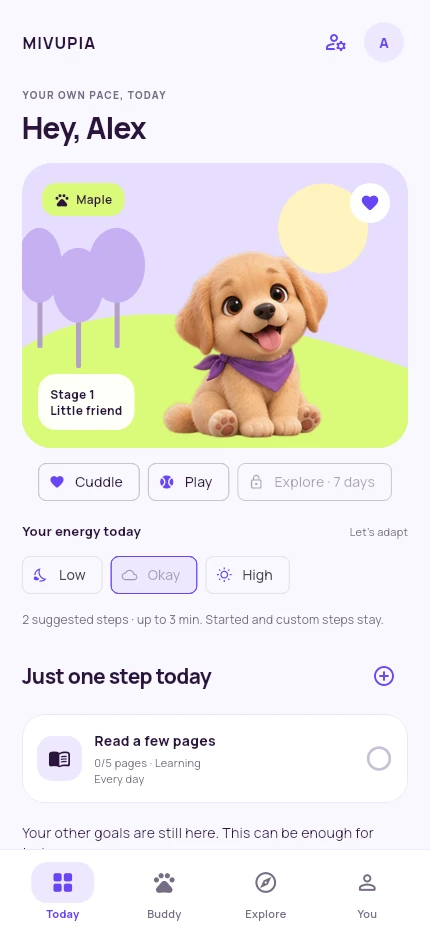
Choose a small task, or make room for just one. You set the pace.
Your own goals have a place here, too. Choose which days they belong to and keep a rhythm that feels like yours.
Growing together
The little things
become a story.
As you return and complete tasks on different days, your companion grows. New stages, story choices, and memories give your days a small thread of continuity.
A completed task earns one active day. Extra tasks don’t rush growth, and taking a break keeps the progress you’ve made.
A return, not a restart.
Life gets busy. Missed days don’t take away your progress. Come back when you’re ready and find your next small step.
At home on your device.
The first edition works without an account or cloud sync. Keep a manual backup, restore it when you need to, or clear your local records.
Your attention stays yours.
No ads in the offline edition. Reminders are optional, and focus time is there when you want it. You decide what belongs in your day.
A few things to know
Before you
say hello.
Is Mivupia available yet?
We’re preparing our first iPhone release. Android is planned. Download links will appear here once the relevant store release is available.
Do I need an account or internet connection?
The first edition doesn’t require an online account. Daily activities and progress work offline. Visiting a web page or sending support email may use an internet connection.
What happens if I take a few days off?
Your progress stays. There’s no streak to repair and no penalty for taking a break. Your companion will be there when you return.
Can I keep a backup of my progress?
Yes. Export your records as JSON, save the text somewhere you trust, and import it manually when needed. Exporting copies text to your clipboard; you still need to save it. See the backup and deletion guide.
Which languages does the app support?
Mivupia supports English and Turkish. This website is in English.
Is this a health or therapy app?
Mivupia is a daily companion experience, not medical care or professional advice. Choose or skip activities to suit your own circumstances.
A small beginning
Good company
is on its way.
We’re putting the finishing touches on Mivupia. Come back for release news, or get in touch if there’s something you’d like to ask.